How to sign up Mercari Japan explanation in english

This article will explain the process of registering with Mercari in english.
When you register with Mercari, you may not know what to do as it is only displayed in Japanese.
So this article is written to help you understand the sign up screen in English, which is displayed in Japanese.
It's important to note that you need to put in an optional invite code. Enter it and you'll get a new registration offer.
Related Articles What is Mercari Japan invite code (coupon)?

Register your information
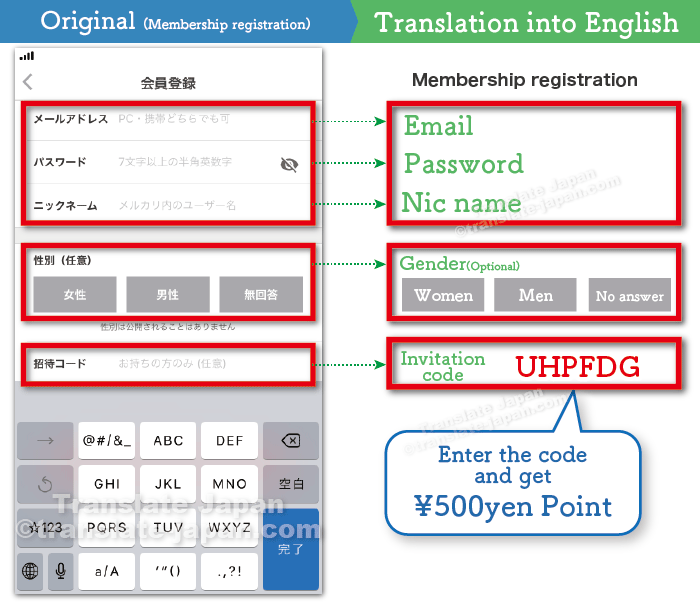
The Mercari app is not multilingual. So please refer to the English translation and enter your membership information.
メールアドレス
(Mail)パスワード
(Password)ニックネーム
(Nic name)性別
(Gender)招待コード
(Invitation Code)
If you need a free email address, you can register a new one by clicking on the link below.
Password
7 or more single-byte alphanumeric characters.
7文字以上の半角英数字
Nic name
User name in Mercari.
メルカリ内のユーザー名
The "user name" you decide here will be made public as your profile name. You can use a nickname instead of your real name. You can also change your nickname after registration. Nicknames can also be in English.
Gender
Gender will not be made public.
性別は公開されることはありません
Invitation Code
You can use the code above by copying and pasting it into the input field.
Related Articles What is Mercari Japan invite code (coupon)?
Registration of personal information
姓(全角)
Last Name (Full-width)名(全角)
First Name (Full-width)姓カナ(全角)
Katakana of Last name (Full-width)名カナ(全角)
Katakana of First name (Full-width)生年月日
Date of birth
The Japanese language uses Kanji characters. However, since there are multiple ways to read a single Kanji, it is customary to add Katakana or Hiragana to the Kanji in your name.
The Japanese language uses Kanji characters. However, since there are multiple ways to read a single Kanji, it is customary to add Katakana or Hiragana to the Kanji in your name.
Enter your first and last name using Hiragana (Full-width)
The 姓(全角)
and 名(全角)
area should be entered using Hiragana (Full-width) or Kanji. Please note that half-width characters cannot be entered.
If you have a Kanji name, you can use it, but if not, you will have to use Hiragana to enter it.
Enter your first and last name using Katakana (Full-width)
The word used here is "Katakana". Please note that half-width characters cannot be entered.
You will need to convert your name into Japanese Katakana. If you enter the name in English below and convert it in Japanese, it will be displayed in Katakana (Full-width).
There are two ways to input double-byte characters: one is to change your smartphone's keyboard to the Japanese input setting. The first is to change your keyboard to input Japanese characters, but this method requires that you can input Japanese characters in romaji.
The second way is to use the link below to enter your name in English and convert it to Japanese (Full-width). When you press the convert button, the name will be displayed in katakana and you can copy it to use.
This method can convert your English name to Katakana, but does not have the ability to convert it to Hiragana.
Confirmation of phone number

"In order to verify your identity, you will be authenticated using SMS (Short Message Service) on your mobile phone. Your phone number will not be shared with other customers."
本人確認のため、携帯電話のSMS(ショートメッセージサービス)を利用して認証をおこないます。電話番号が他のお客様に公開されることはありません。
The phone number you register must be a Japanese number. Because Mercari's SMS verification is only available for numbers that are issued in Japan and begin with 090, 080 or 070.
Verification code
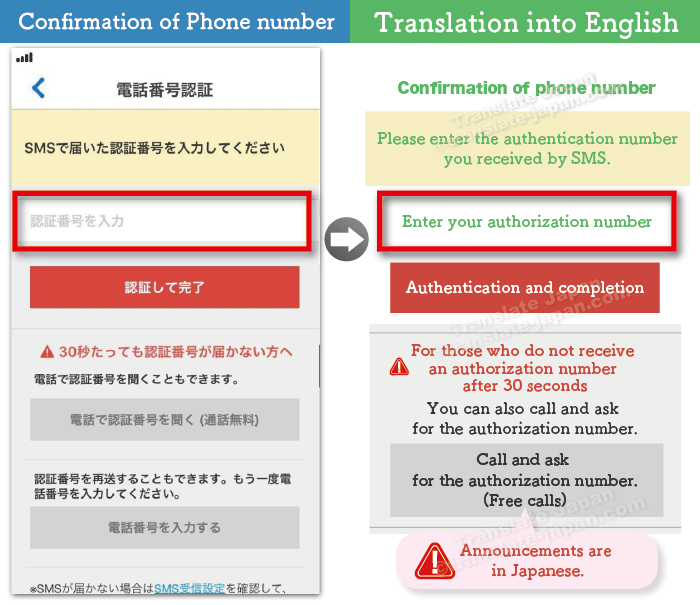
Enter the authentication number sent to you by SMS and press the "Authenticate and Complete" button to complete the phone number verification.
If you don't receive the authorization number after 30 seconds, you can ask for it by voice. In that case, please press the gray button below. Note that the voice guidance will be in Japanese.